1. vIn what two ways does SDM differ from the IOS CLI? (Choose two.)
• SDM is used for in-band management only. The IOS CLI can be used for in-band and out-of-band management.
• SDM is accessed through a Telnet application. The IOS CLI is accessed through a web browser.
• SDM is available for all router platforms. The IOS CLI is available for a limited number of Cisco devices.
• SDM utilizes GUI buttons and text boxes. The IOS CLI requires the use of text-based commands.
• SDM is used for advanced configuration tasks. The IOS CLI is preferred for initial basic device configuration.

2. Which mode will a configured router display at login?
• global configuration mode
• setup mode
• ROM monitor mode
• user EXEC mode

3.


1. In an 8 bit binary number, what is the total number of combinations of the eight bits?
• 128
• 254
• 255
• 256
• 512
• 1024

2. Convert the decimal number 231 into its binary equivalent. Select the correct answer from the list below.
• 11110010
• 11011011
• 11110110
• 11100111
• 11100101
• 11101110

3. How many usable hosts are available given a Class C IP address with the default subnet mask?
• 254
• 255
• 256
• 510
• 511
• 512

4. Which statement describes NAT overload or PAT?
• Each internal address is dynamically translated to an individual external IP address.
• A single internal address is always translated to the same unique external IP address.
• Many internal addresses can be translated to a single IP address using different port assignments.
• Many internal addresses are statically assigned a single IP address and port to use for communications.

5. Which IPv4 class of addresses provides the most networks?
• Class A
• Class B
• Class C
• Class D
• Class E

6. Which statement accurately describes public IP addresses?
• Public addresses cannot be used within a private network.
• Public IP addresses must be unique across the entire Internet.
• Public addresses can be duplicated only within a local network.
• Public IP addresses are only required to be unique within the local network.
• Network administrators are free to select any public addresses to use for network devices that access the Internet.

7. Which two statements describe classful IP addresses? (Choose two.)
• It is possible to determine which class an address belongs to by reading the first bit.
• The number of bits used to identify the hosts is fixed by the class of the network.
• Only Class A addresses can be represented by high-order bits 100.
• Up to 24 bits can make up the host portion of a Class C address.
• Up to 24 bits can be used to identify unique networks.
• Three of the five classes of addresses are reserved for multicasts and experimental use.

8. Company XYZ uses a network address of 192.168.4.0. It uses the mask of 255.255.255.224 to create subnets. What is the maximum number of usable hosts in each subnet?
• 6
• 14
• 30
• 62

9. hat is the network broadcast address for a Class C address of 192.168.32.0 with the default subnet mask?
• 192.168.0.0
• 192.168.0.255
• 192.168.32.0
• 192.168.32.254
• 192.168.32.255

10.
1
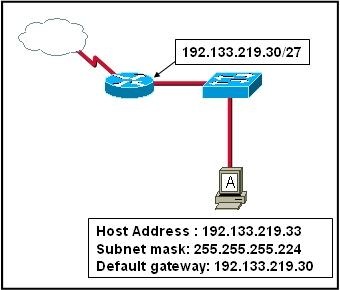
Refer to the exhibit. Host A is connected to the LAN, but it cannot get access to any resources on the Internet. The configuration of the host is shown in the exhibit. What could be the cause of the problem?
• The host subnet mask is incorrect.
• The default gateway is a network address.
• The default gateway is a broadcast address.
• The default gateway is on a different subnet from the host.

11. IPv6 increases the IP address size from 32 bits to how many bits?
• 64
• 96
• 128
• 192
• 256
• 512

12. What is the range of the first octet in a Class B address?
• 127 to 191
• 127 to 192
• 128 to 191
• 128 to 192

13. Which IPv4 class provides the highest number of host addresses per network?
• Class A
• Class B
• Class C
• Class D
• Class E

14.
2
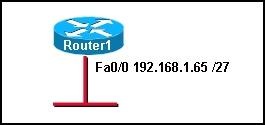
refer to the exhibit. Which range of IP addresses would allow hosts that are connected to the Router1 Fa0/0 interface to access outside networks?
• 192.168.1.0 through 192.168.1.95
• 192.168.1.66 through 192.168.1.94
• 192.168.1.66 through 192.168.1.96
• 192.168.1.0 through 192.168.1.127
• 192.168.1.66 through 192.168.1.128

15. Which option shows the proper notation for an IPv6 address?
• 2001,0db8,3c55,0015,abcd,ff13
• 2001-0db8-3c55-0015-abcd-ff13
• 2001.0db8.3c55.0015.abcd.ff13
• 2001:0db8:3c55:0015::abcd:ff13

16. What are two reasons that NAT was developed? (Choose two.)
• to preserve registered public IP addresses
• to allow users on the public Internet to access local networks
• to provide a method for privately addressed LANs to participate in the Internet
• to make routing protocols operate more efficiently
• to allow private addresses to be routed on the public Internet
• to reduce overhead and CPU usage on gateway routers

17. What must happen for a privately addressed host on an inside local network to be able to communicate with an outside destination host on the Internet?
• The host IP address must be translated to an outside private address.
• The host IP address must be translated to an inside local address.
• The host IP address must be translated to an outside local address.
• The host IP address must be translated to an inside global address.

18. Which port numbers are used by PAT to create unique global addresses?
• 255 and below
• 1024 and below
• 1025 and above
• 64,000 and above

19. Static NAT works by mapping a specific inside local IP address to what other specific address type?
• inside global
• outside local
• outside global
• private IP address

20. What are three advantages of NAT implementations? (Choose three.)
• improved security
• improved router performance
• decreased processor load
• improved scalability
• universal application compatibility
• sharing few public IP addresses with many hosts

1. Tujuan
•Memeriksa denah pada pelanggan.
• Mengusulkan rencana kabel upgrade untuk mengakomodasi ruang lantai tambahan.Latar Belakang / PersiapanSebuah perusahaan menengah memiliki ruang yang ada di lantai dua sebuah menara kantor dan baru saja memperoleh sisa lantai dua. Mereka menanyakan anda untuk memeriksa rencana denah yang ada mereka dan membantu mereka dalam penempatan penempatan baru IDF, kabel untuk mendukung semua ruang kantor baru, dan untuk membantu menentukan apakah semua perangkat yang baru diperlukan.Laboratorium ini dapat dilakukan secara individu maupun kelompok.Sumber berikut diperlukan:
• Rencana Lantai ada (disediakan)Langkah 1: Memeriksa rencana lantai yang ada.a. Dari informasi yang diberikan mengenai rencana lantai yang ada, label item berikut:1) POP – Point of Presence2) MDF – Fasilitas Distribusi Utama3) IDF – Fasilitas Distribusi Intermediate4) Vertikal / Backbone pengkabelan5) Kabel horisontal
b. Apa jenis pemasangan kabel dapat digunakan untuk pemasangan kabel / tulang punggung vertikal? Jelaskan jawaban Anda.
(fiber Optic) Langkah 2: Rencana Evaluasi untuk ruang lantai baru.AnyCompany baru saja bergabung dengan sebuah kelompok desain web kecil dan telah mendapatkan ruang yang tersisa di lantai dua untuk mengakomodasi tim desain web. Ruang baru ini diwakili pada diagram sebagai ruang lantai disorot pada sisi kanan floorplan tersebut. Telah diputuskan untuk menambahkan IDF kedua untuk mendukung workstation di daerah baru.a. Sarankan lokasi yang mungkin untuk IDF baru. Apa ruangan / lokasi yang Anda pilih dan menjelaskan mengapa Anda pikir itu cocok?
b. Apa jenis kabel yang akan Anda sarankan untuk pemasangan kabel vertikal yang diperlukan untuk menghubungkan IDF baru ke MDF ada? Jelaskan alasan Anda.
c. Ruang yang baru berisi kebanyakan kantor. Asumsikan bahwa kantor masing-masing akan ditetapkan dengan 2 tetes data. Juga rencana untuk 2 tetes di auditorium untuk mendukung akses Internet untuk presentasi dan sesi pelatihan. Berapa banyak tetes data tambahan perlu dipesan?
d. Anda telah diminta untuk menentukan jumlah baru 24 port switch yang diperlukan untuk IDF baru. Jangan lupa untuk merencanakan pertumbuhan sekitar 25%. Berapa banyak switch baru AnyCompany perlu membeli?
e. Berapa banyak kabel horizontal akan berakhir pada panel patch di IDF yang baru? €Langkah 3: Periksa ruang lantai dan rencana kabel. a. Apa tetap selain switch yang Anda harapkan untuk temukan di IDF yang baru? b. Apa tetap selain switch yang Anda harapkan untuk temukan di MDF?
c. Menggunakan kabel yang ada berjalan, bisa Anda gunakan UTP untuk menghubungkan perangkat di kamar 2,20 atau 2,30 langsung ke switch di MDF?
Langkah 4. Refleksi
Dengan satu atau dua teman sekelas, diskusikan hal berikut: a. Apakah lebih baik memiliki IDF dalam ruang lantai atau harus perusahaan menjalankan kabel horizontal untuk setiap perangkat langsung kembali ke MDF ada?
b. Berapa banyak akan diperlukan kabel dari MDF ke IDF untuk mendukung switch? Jelaskan jawaban Anda.


kesimpulan dari pertanyaan:
atau lab actifity diatas:
* MDF (Main Distribution Frame) : adalah sebuah tempat terminasi kabel yang menghubungkan kabel saluran pelanggan dari sentral telepon dan jaringan kable yang menuju ke terminal pelanggan. Bila sebuah sentral telepon memiliki 1000 pelanggan, maka pada MDF-nya akan terdapat 1000 pasang kabel tembaga yang terpasang pada slot MDF-nya, dimana setiap pasang kabel tembaga ini akan mewakili satu nomor pelanggan. Dan 1000 pasang kabel yeng terpasang di slot MDF ini akan di-cross coneect dengan 1000 pasang kable lain yang berasal dari saluran pelanggan yang menuju ke pesawat terminal pelanggan. Jadi bila seorang pelanggan ingin agar nomor teleponnya diganti dengan nomor lain, maka proses perubahan nomor ini dapat dengan mudah dilakukan dengan merubah koneksi saluran pelanggan di MDF-nya. MDF bisanya diletakan pada satu gedung yang sama dengan sentral teleponnya (berdekatand engansentral telepon).
Jaringan dibagi
Berhasil umum jaringan data center dapat dibagi menjadi sebagai berikut:
1. pusat data manajemen perusahaan jaringan kantor
Jaringan untuk pengelolaan hari ke kantor perusahaan hari dan digunakan untuk menyediakan platform internet akses jaringan, melalui jaringan virtual untuk mencapai pembagian pembatasan koneksi internet.
2.  perusahaan manajemen jaringan demonstrasi uji
Manajemen jaringan perusahaan untuk menampilkan web hosting layanan demo platform, perusahaan manajemen jaringan jaringan kantor setiap hari dengan setiap isolasi fisik lainnya, sementara beberapa bidang manajemen bisnis jaringan sebagai kawasan pengembangan uji.
3. host jaringan pelanggan kantor
Jaringan dikelola Layanan ini menyediakan pelanggan dengan kantor leasing dan akses Internet untuk penggunaan sehari-hari untuk menyediakan platform jaringan, dibagi dengan jaringan virtual untuk mencapai isolasi pengguna perusahaan yang berbeda.
Sementara beberapa memiliki persyaratan khusus Hu Ke, independen dari antarmuka outreach.
4. host jaringan pelanggan produksi
Proyek berbasis web, jaringan yang paling penting, dapat dibagi menjadi dua kasus untuk dipertimbangkan:
1) Pengelolaan pelanggan outreach dipinjam garis dan garis kabel internal.
Pengkabelan menggunakan MDA — — EDA HDA kabel data center, sesuai dengan tata letak rak kamar mesin menyiapkan jaringan kabinet pertama, diletakkan oleh jaringan serat multimode kamar mesin dan jaringan Gigabit tembaga untuk melawan yang pertama, dan kemudian diletakkan di bawah kebutuhan spesifiktembaga dan kabel serat optik untuk kabinet EDA.
2) Pelanggan outreach garis bangunan independen, untuk meminjam garis kabel internal.
Beberapa pelanggan mungkin meminta Unicom eksternal yang independen, dan dapat mempertimbangkan setiap kamar sejumlah serat single-mode instalasi kabel optik dan kabel koaksial.
Ke dalam setiap kamar jembatan adalah menyisihkan marjin tertentu, untuk memenuhi kebutuhan pelanggan yang berbeda, dan jembatan daerah seharusnya mampu mempertahankan posisi.
5, pengembangan dan pengujian web hosting pelanggan
Jaringan terutama menyediakan jaringan dan sistem dikelola lokasi pengujian host, jaringan yang terkait dengan jaringan lain pada prinsipnya, dan sebuah bangunan terpisah untuk setiap nasabah.
Pemasangan kabel antara perangkat dan lemah set
Set kabel terintegrasi antara ruang peralatan dan yang lemah, termasuk:
Penggunaan Kamar
Telekomunikasi operator ke ruang akses kawat kabel; (untuk kedua arah dari saluran akses)
Lemah antar-lantai MDF IDF
Komunikasi operator ruang akses / DC peralatan jaringan akses ruang komunikasi operator jaringan pusat komputer dan ruang (MDF)
lantai kantor Dikelola pengguna mempertimbangkan dikelola klien jaringan kantor IDF IDF
Pemasangan kabel perencanaan awal
Pusat data total empat unit jaringan komunikasi akses, akses ke sumber daya dari semua akses ruang komunikasi operator ke ruang tandem jaringan (jaringan ruang mesin) manajemen terpadu dan distribusi.
Untuk pengguna biasa dikelola sesuai dengan luas lantai ruangan perencanaan routing daerah, setiap konfigurasi jaringan meja pertama.
Untuk pengguna hosting Kamar VIP lantai kamar, masing-masing kolom rak konfigurasi jaringan meja pertama.
Jaringan tandem kamar ke kamar lantai bagasi kabel meletakkan di antara lemah dan tembaga, dan kemudian melompat dari antar lemah-terhubung ke semua pelanggan dikelola jaringan counter ruang pertama, konfigurasi spesifik jumlah cahaya tembaga luas lantai bawah dan daerah untuk menentukan.
Manajemen kantor staf dan pelanggan dapat berbagi set OA dikelola jaringan kantor, jaringan dapat terhubung dengan Internet.
Pelanggan kantor setiap stasiun kantor informasi umum dapat dikonfigurasi empat poin (tiga data, satu suara), salah satu data titik sebagai jaringan informasi OA poin kantor, sebuah titik data sebagai titik pelanggan informasi manajemen perangkat daerah ruangan, Anda dapatmenerima serangkaian ruang tari sederhana, satu titik data sebagai cadangan.

1. Tujuan
Jalankan utilitas Windows tracert dari komputer host lokal untuk sebuah website di benua yang berbeda.• Interpretasikan output traceroute untuk menentukan ISP paket melewati perjalanan mereka ari host lokal ke situs tujuan.• Gambarkan diagram jalur traceroute, yang menunjukkan router dan ISP awan melewati dari host lokal ke website tujuan, termasuk alamat IP untuk setiap perangkat.Latar Belakang / PersiapanDalam kegiatan ini, Anda akan menggunakan utilitas tracert Windows untuk konektivitas internet peta antara Anda ISP lokal dan ISP lain yang digunakan untuk menyediakan akses internet global. Anda juga akan konektivitas peta utama internet berikut Daerah Registries (RIR). Namun, instruktur Anda dapat memilih situs tujuan yang berbeda.• AfriNIC (African Network Information Centre) – Wilayah Afrika• APNIC (Asia Pacific Network Information Centre) – Asia / Pasifik• ARIN (American Registry untuk Internet Numbers) – Wilayah Amerika Utara• LACNIC (regional Amerika Latin dan Karibia IP Address Registry) – Amerika Latin dan beberapa Kepulauan Karibia• RIPE NCC (Réseaux IP Européens) – Eropa, Timur Tengah, dan Asia TengahKegiatan ini dapat dilakukan secara individual, berpasangan, atau dalam tim. Hal ini dapat dilakukan sebagai suatu kegiatan di kelas atau sebagai pekerjaan rumah, tergantung pada apakah kelas komputer memiliki akses ke Internet.Sumber berikut diperlukan:• Host komputer dengan sistem operasi Windows• Akses ke command prompt• Koneksi internet• Rute menelusuri lembar kerja untuk setiap URL tujuan. worksheet melekat ke laboratorium ini. Setiap siswa menyelesaikan lembar kerja mereka sendiri dan memberikannya ke instruktur.• Global Konektivitas Peta, yang melekat pada akhir laboratorium ini• Akses ke prompt perintah PC
Langkah 1: 
Jalankan utilitas tracert dari komputer hosta. Pastikan bahwa komputer host memiliki koneksi ke Internet.b. Buka jendela Command Prompt dengan mengklik Start> Run dan ketik cmd. Atau, Anda bisa mengklik Start> All Program> Accessories> Command Prompt.c. Pada tracert, prompt ketik dan website tujuan pertama Anda. output akan terlihat seperti berikut:
d. Simpan output tracert dalam sebuah file teks sebagai berikut:1) Klik kanan title bar dari jendela Command Prompt dan pilih Edit> Select All.2) Klik kanan title bar dari jendela Command Prompt lagi dan pilih Edit> Salin.3) Buka program Windows Notepad: Start> All Programs> Accessories> Notepad.4) Untuk menyisipkan output ke Notepad, pilih Edit> Paste.5) Pilih File> Save As dan menyimpan file Notepad ke desktop Anda sebagai tracert1.txt.e. Jalankan tracert untuk setiap situs tujuan dan menyimpan output dalam file berurutan nomor.f. Jalankan tracert dari jaringan komputer yang berbeda, misalnya, dari perpustakaan umum atau dari komputer seorang teman yang mengakses Internet menggunakan ISP yang berbeda (untuk instan kabel bukannya DSL). Simpan salinan output yang di Notepad dan mencetaknya untuk referensi di kemudian hari.
Langkah 2: 
output tracert Menafsirkan untuk menentukan konektivitas ISPRute ditelusuri akan melalui banyak hop dan beberapa ISP yang berbeda tergantung pada ukuran dari ISP dan lokasi sumber dan host tujuan. Pada contoh output ditunjukkan di bawah ini, paket tracert perjalanan dari PC sumber ke default gateway lokal router ke ISP Point of Presence (POP) router dan kemudian ke Internet Exchange Point (IXP). Dari sana mereka melewati dua Tier 2 router ISP dan kemudian meski beberapa router Tier 1 ISP saat bergerak melintasi tulang punggung Internet. Ketika mereka meninggalkan Tier 1 backbone ISP, mereka bergerak melalui lain Tier 2 ISP dalam perjalanan ke server tujuan di www.ripe.net.
a. Buka file output pertama traceroute dan menjawab pertanyaan-pertanyaan berikut.1) Apa adalah alamat IP dari router lokal POP Anda? (64.180.160.254)________________________________________________________________________2) Berapa banyak hop traceroute melakukan paket diambil selama perjalanan dari komputer host ke tujuan? ____(13 hop)________________________________________________________________
3) Berapa banyak yang ISP yang berbeda paket traceroute melewati perjalanan dari komputer host ke tujuan? _________(3 perbedaan)_____________________________________________________
4) Daftar alamat IP dan URL dari semua perangkat di output traceroute dalam urutan seperti yang terlihat pada lembar kerja Rute dilacak.
5) Pada kolom Pemilik Jaringan worksheet, mengidentifikasi ISP memiliki setiap router. Jika router milik LAN Anda, menulis “LAN”. Dua yang terakhir bagian dari URL menunjukkan nama ISP. Sebagai contoh, sebuah router yang memiliki “sprint.net” dalam URL-nya milik jaringan ISP yang disebut Sprint.
6) Apakah lulus traceroute melalui router yang tidak teridentifikasi antara dua ISP? Ini mungkin merupakan IXP. Jalankan perintah whois utilitas atau fungsi whois program traceroute visual untuk mengidentifikasi kepemilikan router itu. Atau, buka http://www.arin.net/whois untuk menentukan kepada siapa IP yang ditetapkan.b. Lengkapi lembar kerja menggunakan file output traceroute untuk setiap URL tujuan lain.c. Bandingkan hasil anda dari file output yang berbeda traceroute. Apakah Anda ISP terhubung ke ISP yang berbeda untuk mencapai tujuan yang berbeda? ______________________________________(tidak)____________________________________
d. Jika anda telah menjalankan traceroute dari jaringan komputer yang berbeda, periksa output untuk file traceroute juga. Apakah jumlah hop yang berbeda untuk mencapai tujuan yang sama dari ISP lokal yang berbeda? ISP yang mampu mencapai tujuan dalam sedikit hop? ___________________________________(tidak), ISP tujuan (destination of ISP network)______________
Langkah 3: Peta konektivitas dari ISPa. Untuk setiap output traceroute, menggambar diagram pada selembar kertas terpisah menunjukkan bagaimana Anda ISP lokal interkoneksi dengan ISP lain untuk mencapai URL tujuan, sebagai berikut:1) Tampilkan semua perangkat secara berurutan dari router LAN ke server situs tujuan. Label semua perangkat dengan alamat IP mereka.2) Gambarkan kotak sekitar router POP lokal yang Anda identifikasi, dan label kotak “POP”.3) Gambar sebuah awan ISP di semua router yang memiliki satu sama ISP, dan label awan dengan nama ISP.4) Gambarkan kotak sekitar setiap router IXP yang Anda identifikasi, dan label kotak “IXP”.b. Gunakan Global Konektivitas Peta untuk membuat gambar gabungan hanya menampilkan awan ISP dan kotak IXP.
dapat dilihat dari gambar:
Global Connectivity Map


Mairita Desni
06446
Pendidikan Teknik Informatika


1. Which two benefits can be gained by locating network equipment in a telecommunications closet, rather than in a user area? (Choose two.)
• faster communication speeds
• improved physical security
• more resistant to hacker attempts
• centralized cable management
• less electrical usage

2. Which three issues should be noted on the technician's site survey report? (Choose three.)
• unlabeled cables
• only two power outlets per wall in each room
• poor physical security of network devices
• horizontal cabling runs under 100 meters
• lack of UPS for critical devices
• two users sharing the same computer

3. Which two types of cable are used for initial router configuration? (Choose two.)
• serial cable
• rollover cable
• straight-through cable
• crossover cable
• patch cable
• console cable

4. In addition to the inventory sheet, what other information about the hosts and networking equipment should be documented by the on-site technician while performing the site survey?
• any obsolete office equipment being stored
• all product keys for site license software
• any planned growth anticipated in the near future
• the memory requirements for installed application software

5.

Refer to the exhibit. What type of device is used to connect two networks?
• hub
• router
• switch
• access point

6. It is said that the goal for availability of a communications system is "five-9s". What is meant by this?
• A down time of .00001% is unacceptable.
• A network needs to be available 99.999% of the time.
• Five percent of all network expense covers 99% of user requirements.
• The most critical time for network availability is from 9:00 to 5:00 p.m. five days a week.
• The best time to do maintenance on a network is from 5:00 p.m. to 9:00 a.m. five days a week.

7. What three things are included in a logical topology document? (Choose three.)
• the location of cables, computers, and other peripherals
• the path that the data takes through a network
• the wireless signal coverage area
• the wiring closet and access point locations
• the device names and Layer 3 addressing information
• the location of routing, network address translation, and firewall filtering

8. Which device has the ability to break up broadcast and collision domains?
• repeater
• hub
• router
• switch

9. Why is it important to review the results of an on-site survey report with the customer before beginning the network design?
• to inform the customer of how much time the upgrade will take
• to discuss the implementation schedule for the new equipment
to verify that the report accurately describes the current network and any plans for expansion
• to layout the new network design and discuss possible equipment upgrades and replacements

10. A client requires a networking device that is capable of expansion to suit growing network demands. What type of device will suit this requirement?
• a networking device with ports that can be activated and deactivated
• a networking device with a modular physical configuration
• a networking device with the ability to be turned off remotely
• a networking device with a cost per port that is as high as possible

11. What does the use of redundant network components supply to a network?
• scalability
• manageability
• compatibility
• reliability

12. What is the benefit for a company to use an ISR router?
• An ISR provides the functionality of a switch, router, and firewall in one device.
• ISRs use a PC operating system for routing traffic, thus simplifying configuration and management.
• An ISR is immune to security attacks by hackers and so replaces all other network security measures.
• ISRs make routing decisions at OSI Layer 7, thus providing more intelligence to the network than do other routers.

13. Which three items are typically found in an MDF? (Choose three.)
• user workstations
• switches and routers
• fax machines
• network equipment racks
• the point of presence
• copier

14. What are two advantages of having ISP-managed services? (Choose two.)
• does not require leasing costs for service
• can guarantee up to 99.999% availability
• eliminates the need for data backup
• increases availability of help desk services
• does not require a Service Level Agreement

15. A manufacturing company is in the process of a network upgrade. Which two statements are true about the phases of the upgrade process? (Choose two.)
• Phase 1 is used to determine network requirements.
• Phase 2 includes creating an analysis report.
• Phase 3 is based on an implementation schedule that allows extra time for unexpected events.
• Phase 4 is where prototypes are created and tested.
• Phase 5 includes identifying and addressing any weaknesses in the design.

16. When designing a network upgrade, which two tasks should the onsite technician perform? (Choose two.)
• configure the servers and routers prior to delivery
• upgrade the network operating system and all client operating systems
• investigate and document the physical layout of the premises
• document the final design for approval by the customer
• perform a site survey to document the existing network structure

17. What is the term for the location at the customer premise where the customer network physically connects to the Internet through a telecommunications service provider?
• backbone area
• point of presence
• network distribution facility
• intermediate distribution frame

18.
2
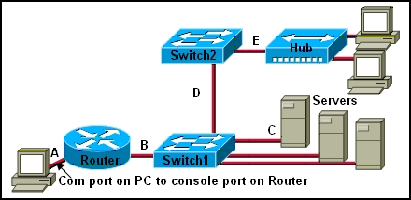
to the exhibit. Which type of twisted pair cable is used between each device?
• A=console, B=straight, C=crossover, D= crossover, E=straight
• A=straight, B=straight, C=straight, D=crossover, E=console
• A=crossover, B=straight, C=straight, D=crossover, E=crossover
• A=console, B=straight, C=straight, D=crossover, E=crossover
• A=console, B=crossover, C=crossover, D=straight, E=straight

19. In what two ways will entering into a managed service agreement with an ISP for a network upgrade affect the costs that are incurred by the customer? (Choose two.)
• Customer IT training costs will increase to enable operation of the new equipment.
• The cost of hardware repairs and support will become the responsibility of the customer.
• Network upgrade and maintenance costs will become predictable.
• Staffing costs will increase because the customer will need to hire additional IT staff to complete the upgrade.
• The company will not need to spend a large amount of money to purchase the equipment upfront.

20. Which type of cable has a solid copper core with several protective layers including PVC, braided wire shielding, and a plastic covering?
• STP
• UTP
• coaxial
• fiber optic

21. What must be added when a network expands beyond the coverage area of the current telecommunications room?
• MDF
• POP
• IDF
• IXP


Mairita Desni
06446
Pendidikan Teknik Informatika


1. Which two functions are provided by the upper layers of the OSI model? (Choose two.)
• placing electrical signals on the medium for transmission
• initiating the network communication process
• encrypting and compressing data for transmission
• segmenting and identifying data for reassembly at the destination

• choosing the appropriate path for the data to take through the network

Mairita Desni 
06446
pendidikan teknik informatika

1. Which two things can be determined by using the ping command? (Choose two.)

• the number of routers between the source and destination device
• the IP address of the router nearest the destination device
• the average time it takes a packet to reach the destination and for the response to return to the source
• whether or not the destination device is reachable through the network
• the average time it takes each router in the path between source and destination to respond

2. What are three main types of high-bandwidth connection options used by medium- to large-sized businesses? (Choose three.)
• DSL
• cable modem
• Ethernet
• metro Ethernet
• T1
• T3

3. What is the maximum T1 transmission speed?
• 56 kbps
• 128 kbps
• 1.544 Mbps
• 2.4 Mbps

4. Which of the following start the test of destination reachability?
• echo request issued by source
• echo reply issued by source
• echo request issued by destination
• echo reply issued by destination

5. Which statement describes a function of a Tier 1 ISP?
• peers with other similarly sized ISPs to form the global Internet backbone
• uses the services of Tier 3 ISPs to connect to the global Internet backbone
• pays Tier 2 ISPs for transit services to connect across continents
• limits the offered services to small geographic areas

6. At which point do individuals and small businesses connect directly to the ISP network to obtain Internet access?
• at a POP
• at an IXP
• at a Metro Ethernet link
• on the ISP extranet

7. What information is contained in the numbered RFCs maintained by the IETF?
• the rules for acceptable use of websites and e-mail
• the descriptions of various hardware components that connect to the Internet
• the specifications and rules for how devices communicate over an IP network
• the standards for cabling and wiring for local Ethernet networks

8. Which network support services team is responsible for testing a new customer connection and for monitoring the ongoing operation of the link?"
• customer service
• help desk
• network operations
• on-site installation

9. Which network support services team identifies whether the client site has existing network hardware and circuits installed?
• customer service
• help desk
• network operations
• planning and provisioning

10. Which ISP network support systems team will typically contact the customer once a new circuit is ready and guide the customer in setting up passwords and other account information?
• help desk
• customer service
• network operations center
• on-site installation team
• planning and provisioning

11. What feature allows network devices to be scalable?
• a fixed number of interfaces
• ease of repair
• modularity
• low maintenance requirements
• low cost

12. Which command generated this output?
• 1 12.0.0.2 4 msec 4 msec 4 msec
• 2 23.0.0.3 20 msec 16 msec 16 msec
• 3 34.0.0.4 16 msec 18 msec 16 msec
• Router# traceroute 34.0.0.4
• Router# nslookup 34.0.0.4
• Router# ping 34.0.0.4
• Router# telnet 34.0.0.4

13. Which network utility helps determine the location of network problems and identifies routers that packets travel across?
• ping
• ipconfig
• traceroute
• ixp

14. What interconnects the Internet backbone?
• gateway routers
• IXPs
• POPs
• satellite dishes

15. What units are used to measure Internet bandwidth?
• bits per second
• bytes per second
• hertz
• megabytes per second
• packets per second

16. The IT manager of a medium-sized business wishes to house the company-owned web servers in a facility that offers round-the-clock controlled access, redundant power, and high-bandwidth Internet access. Which ISP service will fulfill this need?
• web hosting
• planning and provisioning
• application hosting
• equipment colocation
• Tier 1 ISP services

17. What is the purpose of an RFC?
• to provide the connection point for multiple ISPs to the Internet
• to document the development and approval of an Internet standard
• to connect a business to an ISP
• to provide data communication services to ISP customers
• to monitor network performance and connection status of ISP clients

18. When did the Internet become available for use by businesses and consumers?
• 1979
• 1984
• 1991
• 1999
• 2000

19. What was the original purpose of the Internet?
• voice communication
• marketing
• research
• commerce

20. What three support service teams are commonly found within an ISP? (Choose three.)
• help desk
• computer support
• application readiness
• network operations center
• planning and provisioning
• implementation and documentation

About this blog

Followers

Diberdayakan oleh Blogger.
Free Website templateswww.seodesign.usFree Flash TemplatesRiad In FezFree joomla templatesAgence Web MarocMusic Videos OnlineFree Wordpress Themes Templatesfreethemes4all.comFree Blog TemplatesLast NewsFree CMS TemplatesFree CSS TemplatesSoccer Videos OnlineFree Wordpress ThemesFree Web Templates